# Security
# Password Manager
### Setting Your Password
**IMPORTANT YOU CANNOT RESET YOUR PASSWORD AS THIS IS USED AS AN ENCRYPTION KEY**
**USE A VERY STRONG PASSWORD AND ADD A PASSWORD HINT INCASE YOU FORGET**
### Location
| **Url** | [https://vault.maticmedia.co.uk](https://vault.maticmedia.co.uk) |
### Administrator Access
The following users have administrative access if you need to request access to the password manager.
| MaryRose |
| Richard |
| Robert |
| Linda |
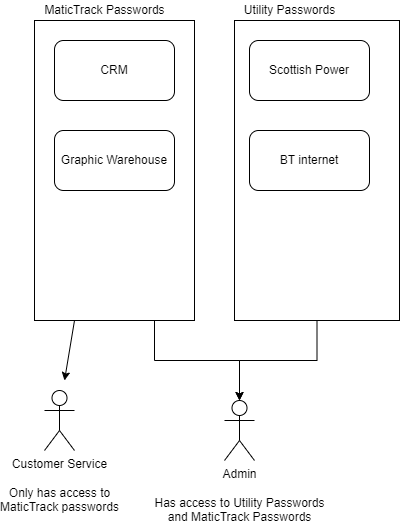
### Collections
Inside the vault you can save... Passwords, Notes, Files etc these are categorised inside Collections. Collections can then be shared with other Vault users.
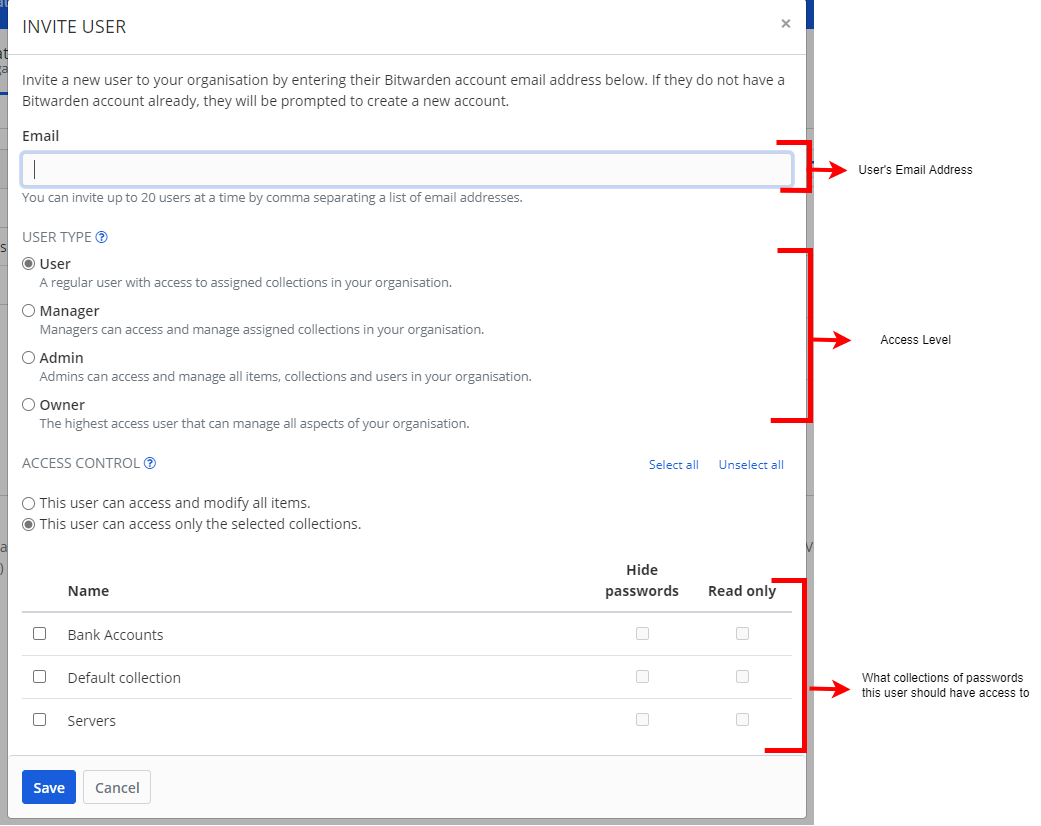
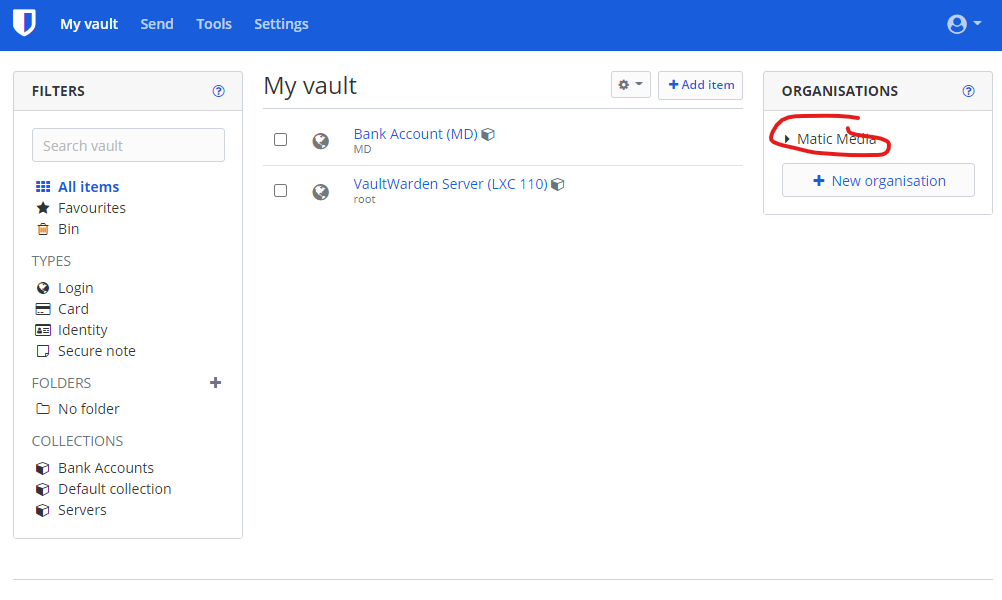
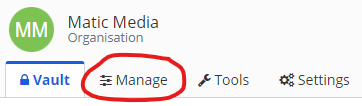
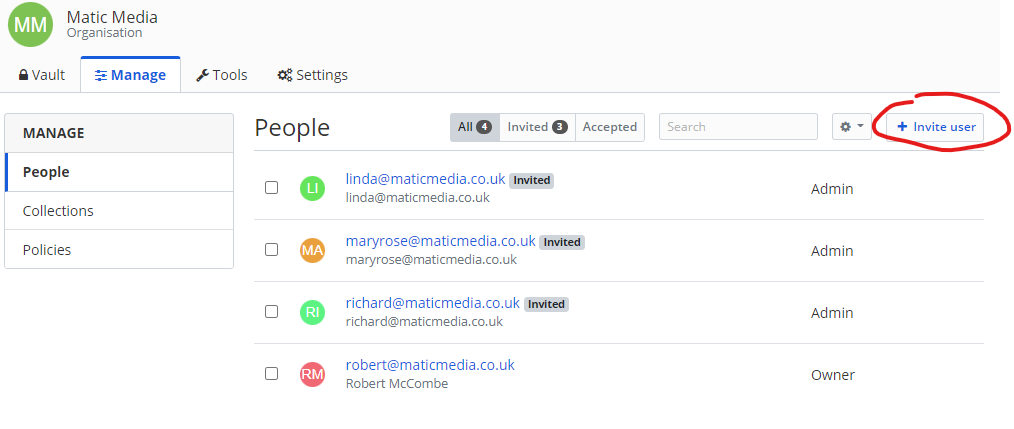
### Adding Users
[](https://manual.maticmedia.co.uk/uploads/images/gallery/2022-05/image-1652271075076.png)
[](https://manual.maticmedia.co.uk/uploads/images/gallery/2022-05/image-1652271105946.png)
[](https://manual.maticmedia.co.uk/uploads/images/gallery/2022-05/image-1652271129094.png)
### Physical Location
Passwords are saved in a VaultWarden instance on **LXC 110 on Server 1 (Internal IP 192.168.0.60)**. Backups are preformed weekly. You can access the Proxmox instance by following the [instructions here.](https://manual.maticmedia.co.uk/books/servers "Servers")
### Browser Extensions & Mobile Apps
There are bitwarden extensions for Firefox, Chrome and Edge.
#### Links to Extensions
| Firefox | [Bitwarden - Free Password Manager – Get this Extension for 🦊 Firefox (en-GB) (mozilla.org)](https://addons.mozilla.org/en-GB/firefox/addon/bitwarden-password-manager/) |
| Edge | [Bitwarden - Free Password Manager - Microsoft Edge Addons](https://microsoftedge.microsoft.com/addons/detail/bitwarden-free-password/jbkfoedolllekgbhcbcoahefnbanhhlh?hl=en-GB) |
| Chrome | [Bitwarden - Free Password Manager - Chrome Web Store (google.com)](https://chrome.google.com/webstore/detail/bitwarden-free-password-m/nngceckbapebfimnlniiiahkandclblb?hl=en)
|
| Android | [Bitwarden Password Manager – Apps on Google Play](https://play.google.com/store/apps/details?id=com.x8bit.bitwarden&hl=en_GB&gl=US)
|
| IOS | [Bitwarden Password Manager on the App Store (apple.com)](https://apps.apple.com/us/app/bitwarden-password-manager/id1137397744)
|
#### How to Setup Browser Extension / Mobile Apps
1. Click the bitwarden icon at the top of the address bar after installing your extension
[](https://manual.maticmedia.co.uk/uploads/images/gallery/2022-05/image-1652270066851.png)
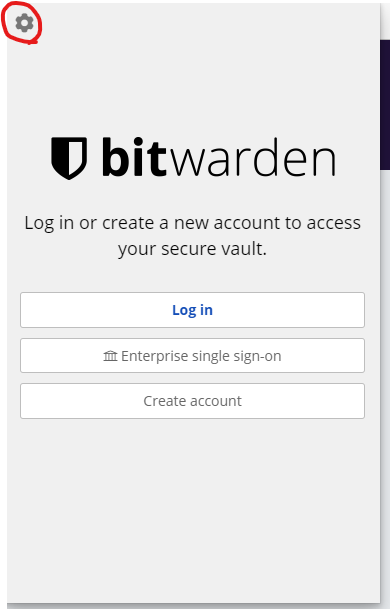
2. Click the cog in the top left of the edge screen
[](https://manual.maticmedia.co.uk/uploads/images/gallery/2022-05/image-1652270028314.png)
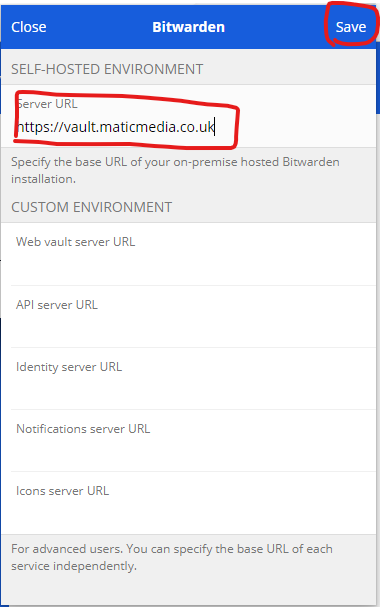
3. Enter the URL [https://vault.maticmedia.co.uk/](https://vault.maticmedia.co.uk/) then click **save**
[](https://manual.maticmedia.co.uk/uploads/images/gallery/2022-05/image-1652270156442.png)
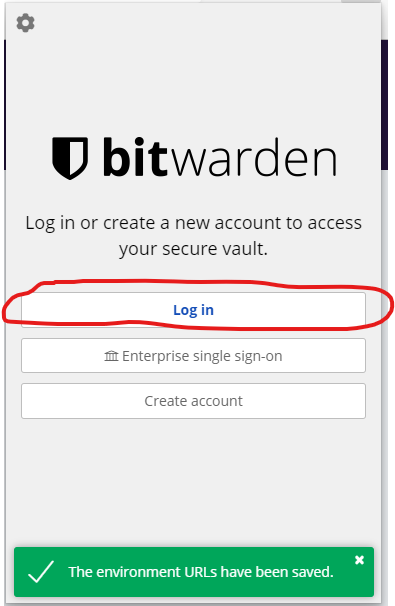
4. Click the login
[](https://manual.maticmedia.co.uk/uploads/images/gallery/2022-05/image-1652270271879.png)
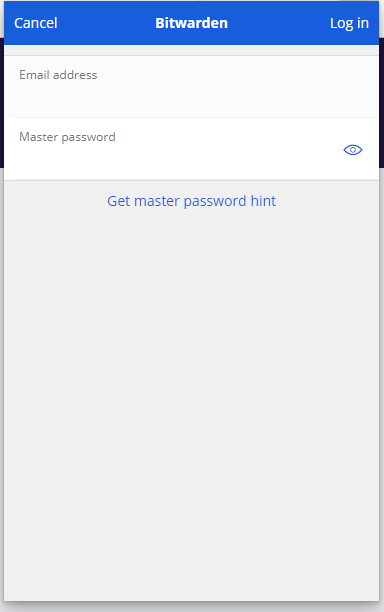
5. Enter your username and password
[](https://manual.maticmedia.co.uk/uploads/images/gallery/2022-05/image-1652270318276.png)
# Information Security Management Policy
**Version:** 1.3 **Date:** November 2024 **Approved by:** Directors
### **1. Purpose**
This policy defines how we protect all information, systems, and data within our business against unauthorised access, loss, misuse, or corruption. It ensures compliance with the UK General Data Protection Regulation (UK GDPR), the Data Protection Act 2018, and our obligations as a registered organisation with the Information Commissioner’s Office (ICO).
---
### **2. Scope**
This policy applies to all staff, contractors, and third parties who access or handle company information or systems, including remote workers. It covers:
- All digital systems, networks, and storage devices
- All business data (customer, supplier, financial, and operational)
- All communications (email, messaging, and file transfer)
---
### **3. Responsibilities**
- **Directors** are responsible for overall information security governance and policy enforcement.
- **Managers** ensure staff comply with this policy and that access rights are appropriate for job roles.
- **All employees** are responsible for safeguarding company and customer data and reporting any suspected breach immediately.
---
### **4. Data Protection & Privacy**
- The company is registered with the **Information Commissioner’s Office (ICO)** under registration number 00018468637.
- Personal data is processed only for legitimate business purposes and retained no longer than necessary.
- All personal and sensitive data is stored securely, with access restricted to authorised personnel.
---
### **5. System & Network Security**
- All company systems are protected by **enterprise-grade antivirus and firewall software**, updated automatically.
- All company laptops and remote devices use **full-disk encryption** and secure VPN connections when off-site.
- Regular security patches, updates, and audits are performed to maintain system integrity.
- Strong password policies and multi-factor authentication (MFA) are enforced wherever supported.
---
### **6. Communication & Data Transfer**
- All customer and supplier communications use **encrypted email and messaging services**.
- Sensitive files are shared via secure, encrypted channels only (e.g., password-protected cloud storage or managed file-transfer systems).
- Portable media (USB drives, external disks) are discouraged and must be encrypted if used.
---
### **7. Access Control**
- Access to systems and data is based on the **principle of least privilege**.
- Accounts are immediately disabled when staff leave the company or change role.
- Administrative access is restricted and logged.
---
### **8. Incident Management**
- Any suspected or actual data breach, cyberattack, or unauthorised access must be reported immediately to the IT Lead or Director.
- Incidents are logged, investigated, and corrective actions implemented.
- Where required, the ICO and affected individuals will be notified within legal timeframes.
---
### **9. Business Continuity & Backup**
- All key data is backed up daily to secure, off-site or cloud-based storage.
- Backup systems are periodically tested for restoration integrity.
- In the event of a system failure, defined recovery procedures are in place to restore operations quickly.
---
### **10. Training & Awareness**
- Staff receive induction and annual refreshers on data protection, phishing awareness, and IT security best practices.
- Failure to follow this policy may result in disciplinary action.
---
### **11. Review & Compliance**
- This policy is reviewed **annually** or following any major change to our systems or regulations.
- The company does **not** accept open-ended liability for malicious damage caused by third parties but commits to maintaining reasonable and effective security controls in line with industry best practice.