**AN EMPLOYEE SHOULD ONLY BE MADE A LEAVER AFTER THEIR FINAL [PAY RUN](https://manual.maticmedia.co.uk/books/payroll/chapter/pay-run "Pay Run") IS COMPLETED.**
**LEAVER PAY RUNS SHOULD BE DOWN IN SEPARATE PAY RUNS**
**HOLIDAYS REMAINING CAN BE A NEGATIVE, IN THIS CASE THEY SHOULD BE A DEDUCTION - EXACTLY THE SAME PROCESS, EXCEPT NEGATIVE HOURS**
**FOR 2022 LEAVERS AN ADDITIONAL 55.3HOURS MUST BE DEDUCTED OFF THE ALLOWANCE**
## Steps to ending an employee's employment in Xero... 1. [Calculate the number of holidays an Employee has left](#bkmrk-calculate-the-number-0) 2. Ask Richard or Robert about any outstanding deductions an employee has 3. Do a [Pay Run for only the leaver](https://manual.maticmedia.co.uk/books/payroll/chapter/pay-run "Pay Run") 4. When doing the Pay Run add the 1. [Holidays Left (or Deduct over holiday allocation)](https://manual.maticmedia.co.uk/books/payroll/page/adding-holidays "Adding Holidays") 2. [Any other deductions](https://manual.maticmedia.co.uk/books/payroll/page/adding-deductions "Adding Deductions") 5. End the employee's employment 6. Generate the employee's P45 ### Calculate the number of holidays an employee has left Steps... 1. [Use GOV website use the calculator to find out the number of holidays the employee is due for the period they have worked of the holiday year](#bkmrk-use-gov-website-use--0) 2. [Total the holidays an employee has used in the holiday year](#bkmrk-total-the-holidays-a) 3. Deduct the total holidays from the remaining holiday allowance #### Use GOV website use the calculator to find out the number of holidays the employee is due for the period they have worked of the holiday year Using the calculator at [Calculate holiday entitlement - GOV.UK (www.gov.uk)](https://www.gov.uk/calculate-your-holiday-entitlement) enter the following information - Year Start Date - **This is always the first of January** - Employee Start Date (if within this holiday year) - Employee Leave Date - Employee Hours Per Week - Employee Days Per Week The calculator will tell you the number of hours the employee is entitled to. #### Total the holidays an employee has used in the holiday year Total any holidays the employee has had in this from the entitled to calculation. You can get a total calculation from the employee's screen and the **"Time Off" section.** 1. Add up all the hours in the time off section up to the point of the employee's end date. 2. In the example below the employee has had **20 hours total paid Holiday (In this example the employee's last date is the 1st of June 2022)****Remember to add on business holidays to this amount, they are not automatically added to this list**
[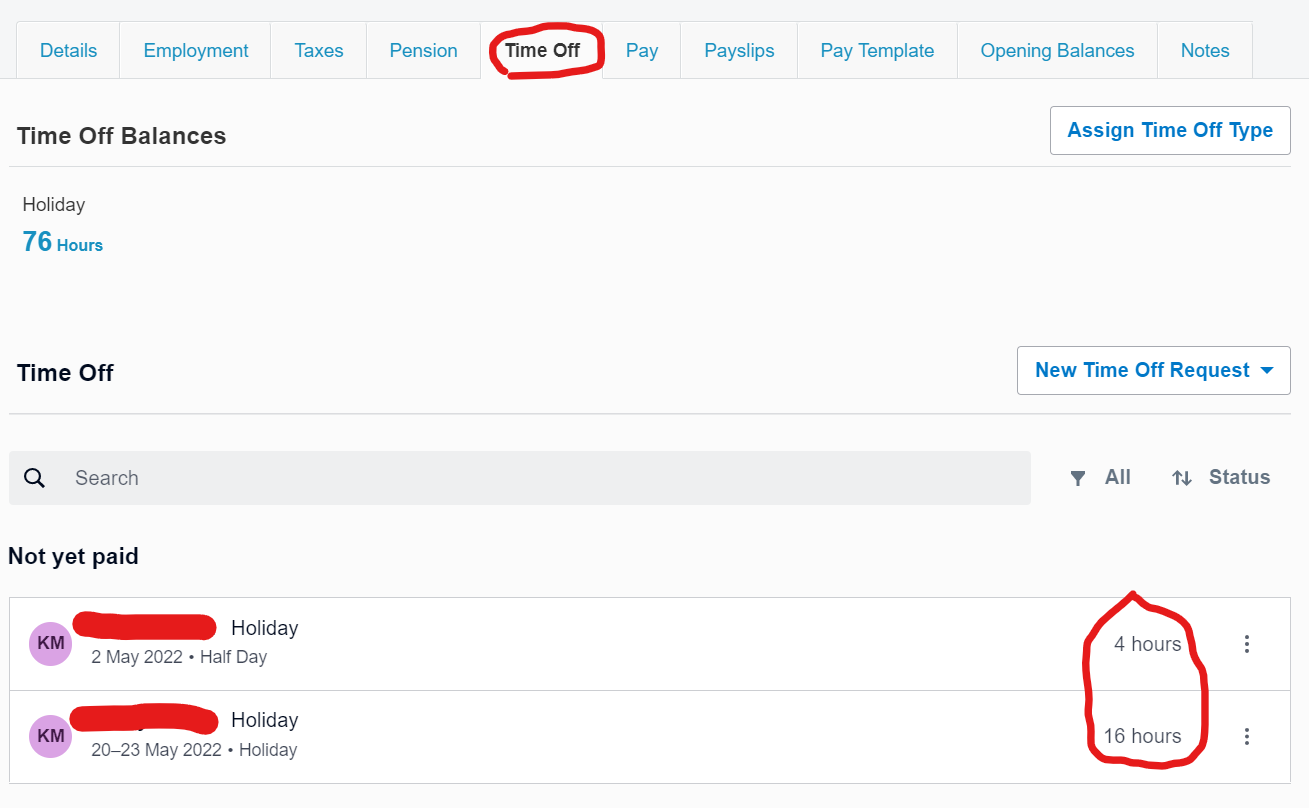](https://manual.maticmedia.co.uk/uploads/images/gallery/2022-05/image-1653421244661.png) #### Deduct the total holidays from the remaining holiday allowance**Equation to be used:** Total remaining holidays to be paid = Remaining allowance = holidays used
##### Example in use Leaver started in 2011, leaving on the 1st of June 2022.| **Leaver Start Date** | 01/02/2011 |
| **Leaver End Date** | 01/05/2022 |
| **Holiday Allowance (Using Calculator)** | 93.3 |
| **Holidays Allowance Used** | 20 |
| **Business Holidays Used** | 16 |
| **Total Allowance Used** | 36 |
| **Holidays Remaining** | 57.3 = round up to nearest hour = 58 |