Networking
How to create a patch cable
Network Map
Adding a Network Map
1. Go to you "My Computer"
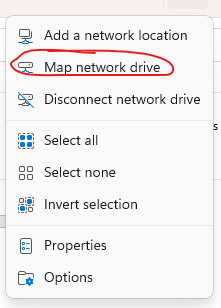
2. From the Ribbon menu select "Map Network Drive"
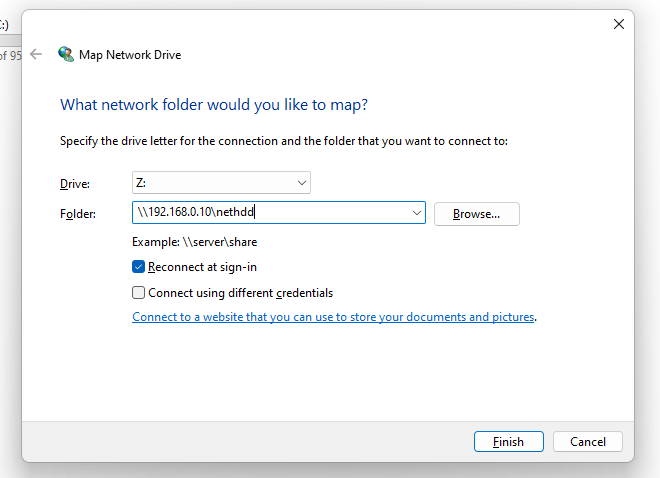
3. Select the drive identifier

| Letter | Drive | Address |
| Z: | Nethdd | \\192.168.0.10\nethdd |
| L: | Customers | \\192.168.0.10\root\customers\ |
| M: | Matic Media | \\192.168.0.10\root\customers\M\Matic Media Services Ltd |
4. Fill in map to match above table
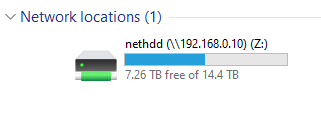
5. The drive will be added to your My Computer (This PC)
IP Addresses
| Device | Type | IP |
| Mimaki TX300p-1 | Printer | 192.168.0.245 |
| Mimaki TX300p-2 | Printer | 192.168.0.242 |
| Mimaki UJV3060 | Printer | 192.168.0.188 |
| Colorado | Printer | 192.168.0.211 |
| Mesh Central | Remote Control | 192.168.0.203 |
| Colorado RIP Station | Computer | 192.168.0.244 |
| LIYU Rip Station | Computer | 192.168.0.214 |
Cameras
| Camera | IP address | Settings link |
|---|---|---|
| Printing | 192.168.1.6 | Open camera |
| Production | 192.168.1.7 | Open camera |
| Kitchen | 192.168.1.8 | Open camera |
| Reception | 192.168.1.9 | Open camera |
| Sales office | 192.168.1.10 | Open camera |
| External outside staff | 192.168.1.11 | Open camera |
| Finishing dirty | 192.168.1.12 | Open camera |
| External Rear Collections | 192.168.1.13 | Open camera |
| External Collections | 192.168.1.14 | Open camera |
| External Rear Fire Exit | 192.168.1.15 | Open camera |
| External Side Fire Exit | 192.168.1.16 | Open camera |
| External Front | 192.168.1.17 | Open camera |
| External Side Front Corner | 192.168.1.18 | Open camera |
| External Front Side | 192.168.1.19 | Open camera |
| Collections and deliveries | 192.168.0.238 | Open camera |