You must have permissions to Manual Journals to make Sales Accruals
#### 1. From the Accounting Menu > Manual Journals [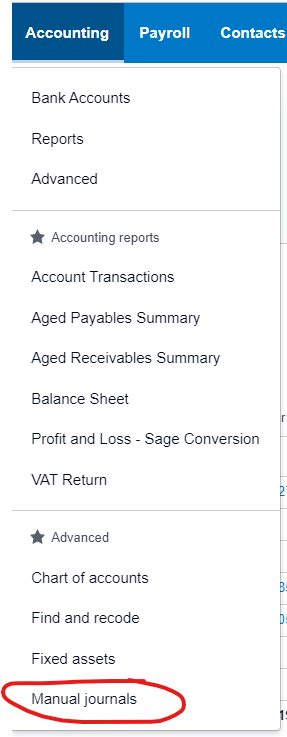](https://manual.maticmedia.co.uk/uploads/images/gallery/2022-05/image-1652276936895.png) #### 2. Select New Journal [](https://manual.maticmedia.co.uk/uploads/images/gallery/2022-05/image-1652277054959.png) #### 3. The Narration is so you can quickly see the content of the journal, think of it like the invoice number [](https://manual.maticmedia.co.uk/uploads/images/gallery/2022-05/image-1652277108642.png) ##### 3.1 For Sales Invoices the Narration should be the Invoice Number and Customer you are accruing for e.g. QUO:927668 J Thomson Colour Printers Limited [](https://manual.maticmedia.co.uk/uploads/images/gallery/2022-05/image-1652277211144.png) #### 4. Enter the lines of the Manual JournalIf you are accruing for Sales Invoices, you should also accrue for the Stock and Supplier Costs as Bill Accruals
For Sales Invoices there should be two lines, one Credit to Nominal Code 4102 - Unconfirmed Sales and one Debit to Nominal Code 2109. **The credit amount should be the total amount of the invoice.** [](https://manual.maticmedia.co.uk/uploads/images/gallery/2022-05/image-1652277478512.png) #### 5. Select the Date You should select the date you want the accrual to appear in. e.g. If you are accruing an May Invoice in April it would be 30/04/2022 [](https://manual.maticmedia.co.uk/uploads/images/gallery/2022-05/image-1652277632546.png) #### 6. Select the Automatic Reversing Date For sales invoices you should always set the Auto Reversing Date as the following month, this allows you to track when a Sales Invoice has been properly invoiced and reversed. [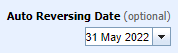](https://manual.maticmedia.co.uk/uploads/images/gallery/2022-05/image-1652277725360.png)