# Pole Pockets
### How to Calculate Required Pocket Size for a Pole
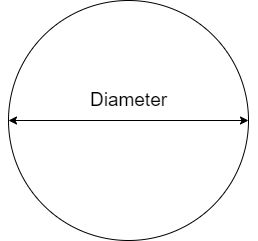
You need to the know the diameter of the pole in millimetres.
#### Pole Diameter
####
Pocket Size Formula
> **Minimum Pocket Size = ((2\*π\*(Diameter / 2))/2) + 5**
So for a 35mm Diameter pole...
> **((2\*3.14\*(35 / 2))/2) + 5 = 59.95mm**
So for a 35mm Diameter pole you would need a 60mm pocket.
#### Required Pocket Size Calculator
Sometimes it's easier just using a calculator! Enter the pole diameter in the box below and it'll automatically calculate the minimum pocket size.
Pole Diameter (mm)
Minimum Pocket Size (mm)
### Setting Up Artwork for a Pole Pocket
#### Setting Up Artwork for a Pocket on Banner
**Pole Pocket Size**
50mm
**Bleed for Join**
25mm
**Trim Bleed**
3mm
##### Example
For a 300mm x 300mm Banner with a 50mm Pocket Top and Bottom the print file size would be
**Formulas**
Width = Trim Bleed + Banner Finished Size + Trim Bleed
Height = Trim Bleed + Bleed for Join + Pole Pocket Size (Top) + Banner Finished Size + Bleed for Join + Pole Pocket Size (Bottom) + Trim Bleed
**Working Example**
Width = 3 + 300 + 3 = 306mm
Height = 3 + 25 + 50 + 300 + 50 + 25 + 3 = 456mm
**Total Print File Size**
306mm x 456mm
##### Image Example
[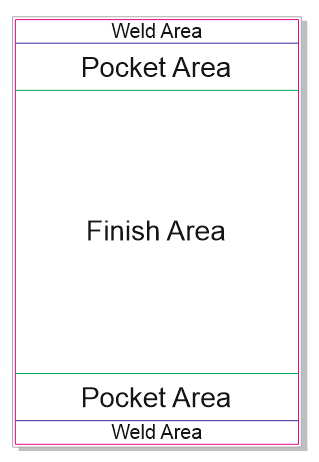](https://manual.maticmedia.co.uk/uploads/images/gallery/2022-05/image-1652710363113.png)
##### PDF Template Example
[Banner Pole Pocket 50mm Example.pdf](https://manual.maticmedia.co.uk/attachments/7)
#### Setting Up Artwork for a Double-Sided Pole Pocket Banner
Use the same formula as above for the single-sided, however for double-sided one of the sides must have the 'Pocket Area', 'Hem' and 'Hem Join' kept white (empty). Markers can be added to the print bleed to mark the weld area (to help align with the 'Finish Area')
#### Setting Up Artwork for Pocket on Fabric
**Pole Pocket Size**
50mm
**Bleed for Joining Strip**
10mm
**Trim Bleed**
3mm
##### Example
For a 300mm x 300mm Flag with a 50mm Pocket Top and Bottom the print file size would be
**Formulas**
Width = Trim Bleed + Flag Finished Size + Trim Bleed
Height = Trim Bleed + Bleed for Join + Pole Pocket Size (Top) + Flag Finished Size + Bleed for Join + Pole Pocket Size (Bottom) + Trim Bleed
**Working Example**
Width = 3 + 300 + 3 = 306mm
Height = 3 + 10 + 50 + 300 + 50 + 10 + 3 = 456mm
**Total Print File Size**
306mm x 426mm